
Lesson 5 · Beginner · 15 min
Verify with Google Search: the double-check button
Use Gemini's built-in Google Search double-check tool. Interpret green and orange highlights to isolate unverified claims and factual gaps.
- Goal
- You will activate Gemini's Google Search double-check feature and interpret green vs orange highlights to guarantee factual integrity.
- Skills
- Check

Your first attempt, unaided
Ask Gemini a current events query, then click the Google (G) icon beneath the answer to observe source verification highlights.
Gemini Search double-check button evaluates generated statements against indexed public web content. Passages supported by search results are highlighted in green with clickable citations, while uncorroborated or conflicting assertions appear highlighted in orange. This automated cross-referencing tool provides an essential safeguard for validating competitive intelligence, market summaries, and regulatory overviews before dissemination.
1Grounding in the web index: how the G button works
The Google double-check button provides automated fact validation by cross-referencing generated statements against public search engine results. This mechanism highlights corroborated facts in green and flags divergent statements in orange.
Accessible via the Google icon below answers on gemini.google.com, this tool checks model output against web pages. Green highlights show clickable web snippets confirming the statement. Orange highlights signal factual contradictions or an absence of consensus online. This serves as an invaluable guardrail when vetting regulatory updates, market trends, or vendor statements.
Visual indicator Technical meaning Required user action Important limitation Green highlight Corroborated by online web sources Click to inspect source authority Does not guarantee that web pages are accurate Orange highlight Not found or contradicted online Manually correct or delete statement Can occur on recent unindexed developments Unhighlighted text Opinion, reasoning, or non-factual prose Review paragraph logic carefully Outside the scope of web fact-checking 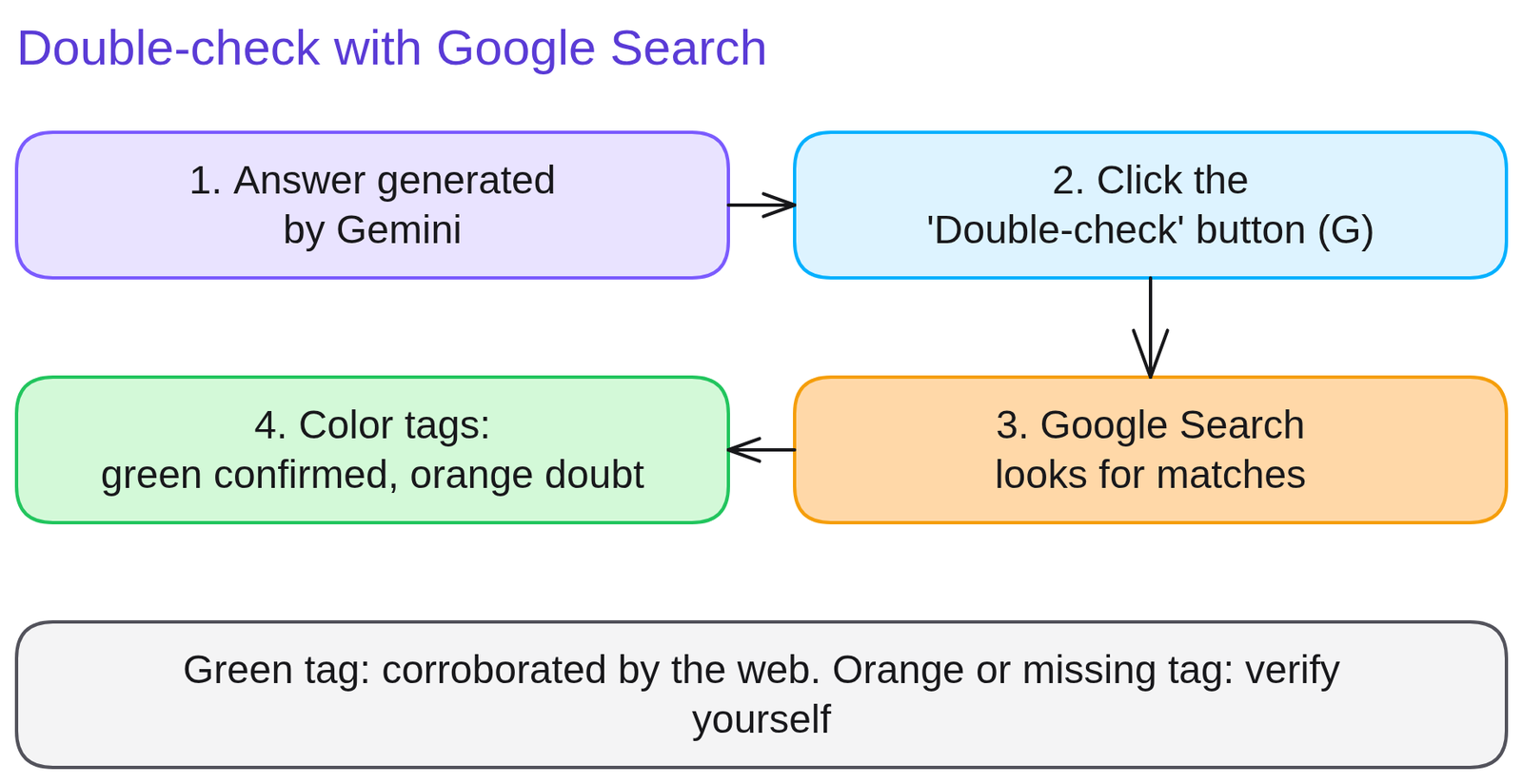
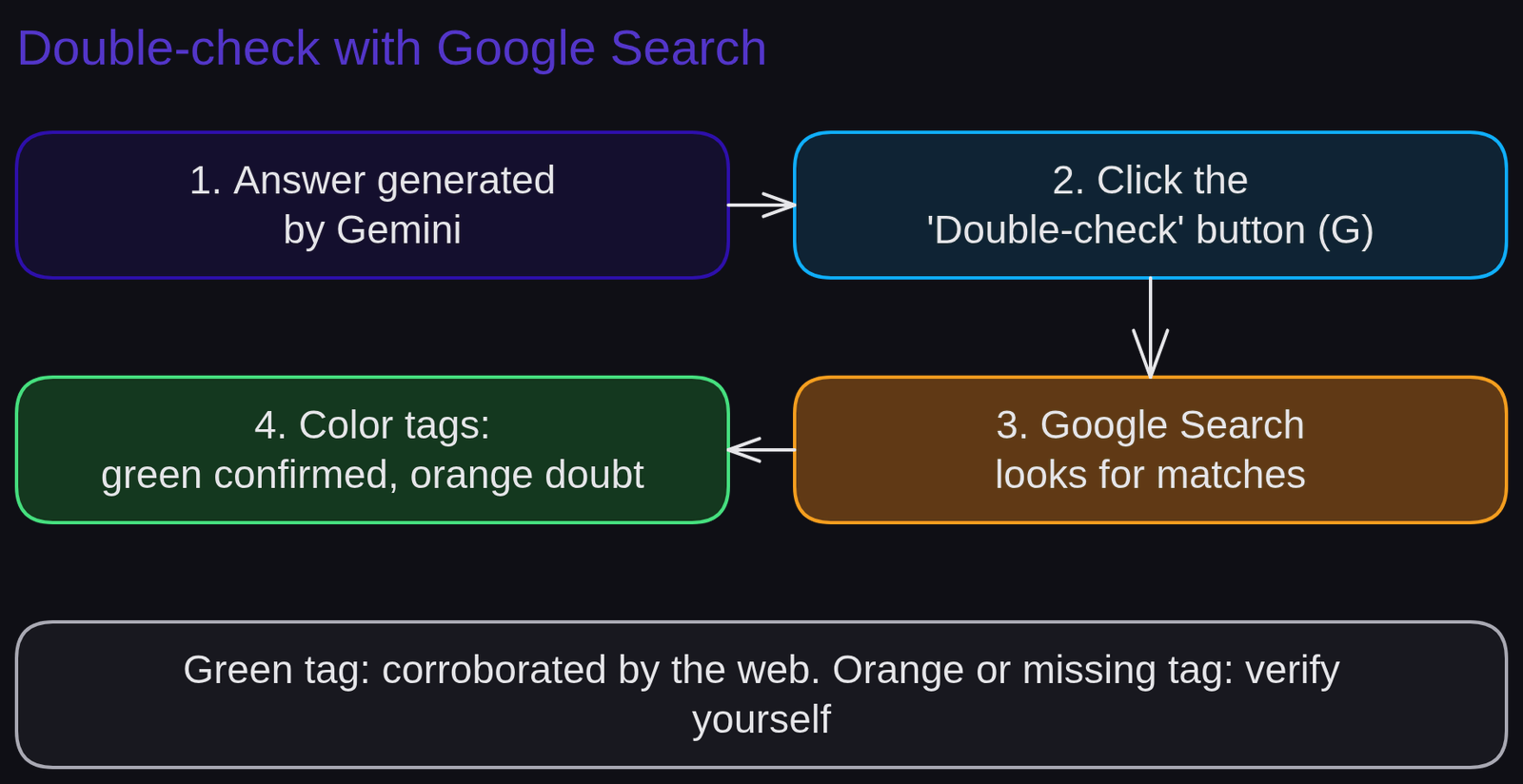
Diagram 'Double-check with Google Search'Diagram generated by AI and reviewed 2Spotting an invalid compliance deadline via orange highlighting
Catching contested claims in a market intelligence briefing demonstrates how automated Google Search validation immediately isolates factual discrepancies in strategic business analyses.
A market researcher asks Gemini about new European Union packaging waste directives.
Weak prompt.
Give me a quick briefing on the new ban deadlines for single-use plastic packaging in Europe.Gemini outputs specific calendar years but mixes early Commission proposals with final dates ratified by Parliament.
Strong prompt.
Summarize the four binding phase-out deadlines for single-use plastics adopted by the European Union. Then click the Google double-check icon to compare each deadline against official announcements.The difference. The analyst triggers the double-check tool: two dates turn green with links to European Parliament statements, while one unverified date turns orange, averting circulation of an inaccurate target year.
3Audit a data-heavy answer with double-check
Run the Search double-check on an industry briefing to establish a dependable workplace habit of validating AI outputs against authoritative public sources before making decisions.
Request a market share comparison of three leading vendors in your sector. Click the Google icon below the response. Inspect green and orange highlighted passages and open the cited links.
Run this prompt:
'What significant developments marked the maritime freight logistics sector in 2025? Provide three quantified facts with the relevant operators.'
Self-evaluation rubric: (a) the Search double-check feature triggers successfully ; (b) every green highlight is inspected by clicking the source snippet ; (c) orange and unhighlighted claims undergo independent manual verification.
4Mistaking unhighlighted text for positive validation
Mistaking green highlighting for a guarantee of absolute truth is a dangerous trap because inaccurate online reporting or unverified blogs can easily turn text green.
Google double-check evaluates textual agreement with indexed web pages, but it does not assess the scientific or statutory validity of those pages. If an inaccurate claim is echoed across several blogs, Gemini may still highlight the sentence in green.
Fix: always click through green highlights to evaluate publisher credibility (official government gazette, audited filing, or unvetted forum).
Rule to remember: green highlighting confirms that online sources report the same statement, not that the statement is correct.
5Quiz
Three questions, instant feedback. Each option comes with an explanation.
6Proof of mastery
Share an audit using the G button: paste the response noting green/orange highlights and the verified source URL inspected.

Criteria
What you wrote at the start of the lesson


Going further
Review the glossary entries for grounding, citation, and web search. The next lesson, Privacy and Gemini data: corporate safeguards before prompting, establishes crucial rules to protect your organization. To explore programmatic retrieval grounding, examine Discover Google AI Studio.
Frequently asked questions
Where is the double-check button located?
It sits directly underneath every response in Gemini, represented by Google's round 'G' logo icon (labeled 'Double-check response').
What does a green highlight signify?
Green shows that Google Search discovered corroborating public web sources confirming that exact claim. You can click to view the source URL.
What does an orange highlight signify?
Orange indicates that Google Search found differing or contradictory content online, or could find no consensus confirming the statement.