
The four levels
The four levels of the course, Beginner, Intermediate, Advanced and Expert: what you can do at each step, the success criterion and the associated badge.
In brief. Each level describes what you will achieve upon completing its lessons. It assesses three core operational skills: framing your request, verifying the response before use, and steering prompt workflows across your team.
A level is validated when, for each of its lessons, the quiz is passed and the proof of mastery is submitted. A badge is then issued. You choose the order of lessons within a level freely.
Level 1
Beginner
“I say clearly what I want”


- What the level contains
- 6 lessons · 90 min of reading in total
- What you can do
- State a goal in one sentence with a precise action verb. Say for whom and for what. Specify the expected format and length. Paste or attach the text to process instead of describing it. Proofread the answer before using it.
- Success criterion
- Out of ten prompts in the portfolio, at least eight contain the four ingredients, and at least seven produce a usable output after at most one follow-up.
 Lesson 1 · Beginner · 15 min
Copilot Chat: what is included in your Microsoft 365
What Microsoft 365 Copilot Chat includes without a paid licence: web chat, attached files, images, Pages, agents, and what it cannot see of your organisation.To do Lesson 2 · Beginner · 15 min
How a generative AI answers, and why it can be wrong
What a generative AI does when it answers: it predicts plausible words rather than looking up facts. Where errors come from and how to limit them.To do Lesson 3 · Beginner · 15 min
Writing a good prompt: the four ingredients
The four ingredients of a good Copilot prompt: goal, context, expectations, source. Before and after on a real case, guided exercise, quiz and proof of mastery.To do Lesson 4 · Beginner · 15 min
Your first useful conversation: summarise, rephrase, translate
Summarise, rephrase, translate a text you provide: the three safe tasks in Copilot Chat, with the follow-up that improves the answer without starting over.To do Lesson 5 · Beginner · 15 min
Checking an answer: sources, figures, dates
Three checks before using a Copilot Chat answer: open the cited sources, cross-check every figure, date every piece of information.To do Lesson 6 · Beginner · 15 min
Before you paste a text: personal and confidential data
What Copilot Chat does with your prompts: no training, but logging and audit. One rule to decide what to paste, and how to anonymise.To do
Level 2
Intermediate
“I give the model what it needs to do well”


- What the level contains
- 7 lessons · 115 min of reading in total
- What you can do
- Attach the right files and say what to do with them. Provide one or two examples of the expected result. State positive constraints and "if... then" rules. Put the source at the end of the prompt. Iterate by changing one thing at a time. Tell the model what to do when information is missing.
- Success criterion
- On the same case, two versions of the prompt are produced and the difference in output is documented; at least three techniques of the level are visible in the final version; the example format is respected on three tries.
 Lesson 7 · Intermediate · 15 min
Iterating: the first answer is a draft
Iterating a prompt in Copilot Chat: the first answer is a draft. Precise follow-up, critique of the answer, before and after example, exercise and quiz.To do Lesson 8 · Intermediate · 15 min
Attaching a Word, PDF or Excel file and asking the right questions
Attach a Word, PDF or Excel file to Copilot Chat and ask the right questions: accepted formats, limits, prompt before and after, exercise and quiz.To do Lesson 9 · Intermediate · 15 min
Web on or off: when Copilot should search
Switching web search on or off in Copilot Chat: when the web helps, when it hurts, how to demand verifiable dates and URLs. Example, exercise and quiz.To do Lesson 10 · Intermediate · 15 min
Giving examples and a role to set the style
Give Copilot Chat examples and a role to set the style: what a role changes, what it does not, prompt before and after, exercise and quiz.To do Lesson 11 · Intermediate · 15 min
Comparing two answers with a grid
Compare two Copilot Chat answers with a four-criteria grid: accuracy, relevance, format, sources. Method, example, exercise and quiz.To do Lesson 12 · Intermediate · 20 min
Hallucination hunt: an exercise on a doctored output
Hallucination hunt: a doctored Copilot output with four planted errors to spot, their correction, the verification method, exercise and quiz.To do Lesson 13 · Intermediate · 20 min
Writing meeting minutes from the Teams transcript
Transcribe a Teams meeting, download the .docx transcript, attach it to Copilot Chat and get checkable minutes, an action table and a follow-up email.To do
Level 3
Advanced
“I make it reason and I make it verify”


- What the level contains
- 6 lessons · 115 min of reading in total
- What you can do
- Break a complex task into steps or chained prompts. Ask for verbatim quotations before analysis. Require a "what I did not find" section. Analyse a data file with an explicit calculation plan. Write a review grid and apply it. Produce an iterated deliverable in Pages.
- Success criterion
- On a case of three documents, the synthesis links every statement to a verifiable quotation; a peer checks five statements at random and finds none false; the "not found" section is present and accurate.
 Lesson 14 · Advanced · 20 min
Breaking a task down into three chained prompts
Break a complex task down into three chained prompts in Copilot Chat: plan, production, review, with human validation between each step.To do Lesson 15 · Advanced · 20 min
Analysing an Excel table with the built-in Python interpreter
Analyse an attached Excel table in Copilot Chat with the built-in Python interpreter: prepared file, closed question, stated method, cross-checked result.To do Lesson 16 · Advanced · 20 min
Pages and Notebooks: keeping and sharing your work
Copilot Pages and Notebooks in Copilot Chat: keep a piece of work, gather the sources of a recurring task, share with your team, and know the limits.To do Lesson 17 · Advanced · 15 min
Generating a presentation visual: rights and labels
Generate a presentation visual with Copilot Chat: a five-part image prompt, an unpublished quota, no real people, and the mandatory AI label.To do Lesson 18 · Advanced · 20 min
Building your team's prompt library
Build your team's prompt library: one card per prompt with variables, a sample output, known limits and an owner, stored in a shared Page.To do Lesson 19 · Advanced · 20 min
Writing an evaluation grid and having Copilot apply it
Write an evaluation grid of observable criteria, have Copilot Chat apply it in a separate conversation, then correct and measure the gap.To do
Level 4
Expert
“I design prompts that others reuse”


- What the level contains
- 6 lessons · 120 min of reading in total
- What you can do
- Maintain a library of versioned prompts. Write meta-prompts. Build a simple agent with instructions, sources and examples. Run an A/B test on a small set of cases. Document the risks and train peers. Know when not to use an AI.
- Success criterion
- A prompt or an agent is adopted by at least two colleagues; the associated test set scores at least 8 out of 10; the library sheet has a version, a date, a use case, a sample output, known limits and an owner.
 Lesson 20 · Expert · 20 min
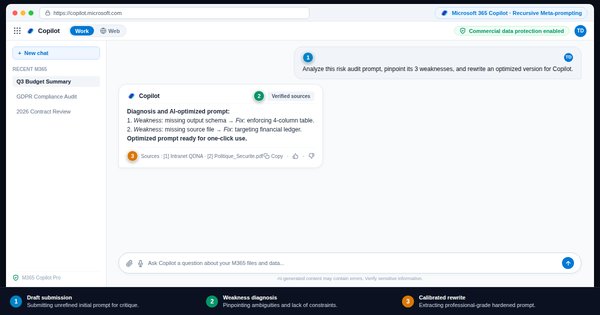
Asking Copilot to improve your prompt
The meta-prompt: have Copilot Chat rewrite your prompt block by block, with a reason for every change, then decide what you keep.To do Lesson 21 · Expert · 20 min
Creating a simple agent with the agent builder
Create a declarative agent in Copilot Chat with the agent builder: role, scope, refusals, format and examples, free as long as it does not read SharePoint.To do Lesson 22 · Expert · 20 min
Evaluating a prompt on a set of ten cases
Measure a prompt instead of feeling it: ten cases with an expected answer, three runs, one rule changed at a time, and a compared score.To do Lesson 23 · Expert · 20 min
Sycophancy, prompt injection, drift: the failure modes
Three failure modes to counter in Copilot Chat: the sycophancy that agrees with you, the injection hidden in a file, the drift of long conversations.To do Lesson 24 · Expert · 20 min
Training your colleagues: a one-hour workshop ready to run
A one-hour workshop on Copilot Chat, ready to run: cold attempt, demonstration, exercise in pairs, teaching a colleague, proof to take away.To do Lesson 25 · Expert · 20 min
Writing your team's AI usage policy
A ten-article template for a Copilot Chat usage policy: data, sources, proofreading, transparency, and the training required by Article 4 of the AI Act.To do