
Lesson 11 · Intermediate · 15 min
Google Workspace extensions: querying Drive, Gmail, and Docs
Use Google Workspace extensions (@Drive, @Gmail, @Docs) to retrieve recent documents, search email threads, and summarize corporate files.
- Goal
- You will master @Google Drive, @Gmail, and @Docs mentions in Gemini to cross-reference workplace documents in real time.
- Skills
- Frame

Your first attempt, unaided
Type @Google Drive in the Gemini prompt box and ask for the three most recently edited files related to your current project.
Google Workspace extensions connect Gemini directly to your daily productivity tools: Gmail, Google Drive, Google Docs, and Google Calendar. Using the @ syntax, you can query internal documents and cross-reference email threads without switching tabs. Every query enforces your existing organizational permissions without altering source files.
1The @ syntax: summoning workplace tools without switching tabs
The @ syntax summons workplace productivity tools without switching application tabs or copying attachments. By entering @Google Drive or @Gmail inside your prompt, Gemini searches directly across your secured corporate workspace.
This native integration transforms Gemini into a unified workspace portal for organizational data. You can locate a recent vendor quotation received via email, cross-reference pricing with a Drive spreadsheet, and draft a response document in Google Docs. Every connector operates in real time within your enterprise boundary, preventing data leaks to unauthorized third parties.
Workspace extension Accessible data assets Supported action Prompting recommendation @Gmail Inbox messages and conversation threads Summarize correspondence and draft replies Specify sender and date ranges @Google Drive Docs, Sheets, Slides, and PDF files Locate and analyze internal documents Name the exact target file title @Google Calendar Scheduled team meetings and calendars Review open time slots and identify conflicts Specify the target business week 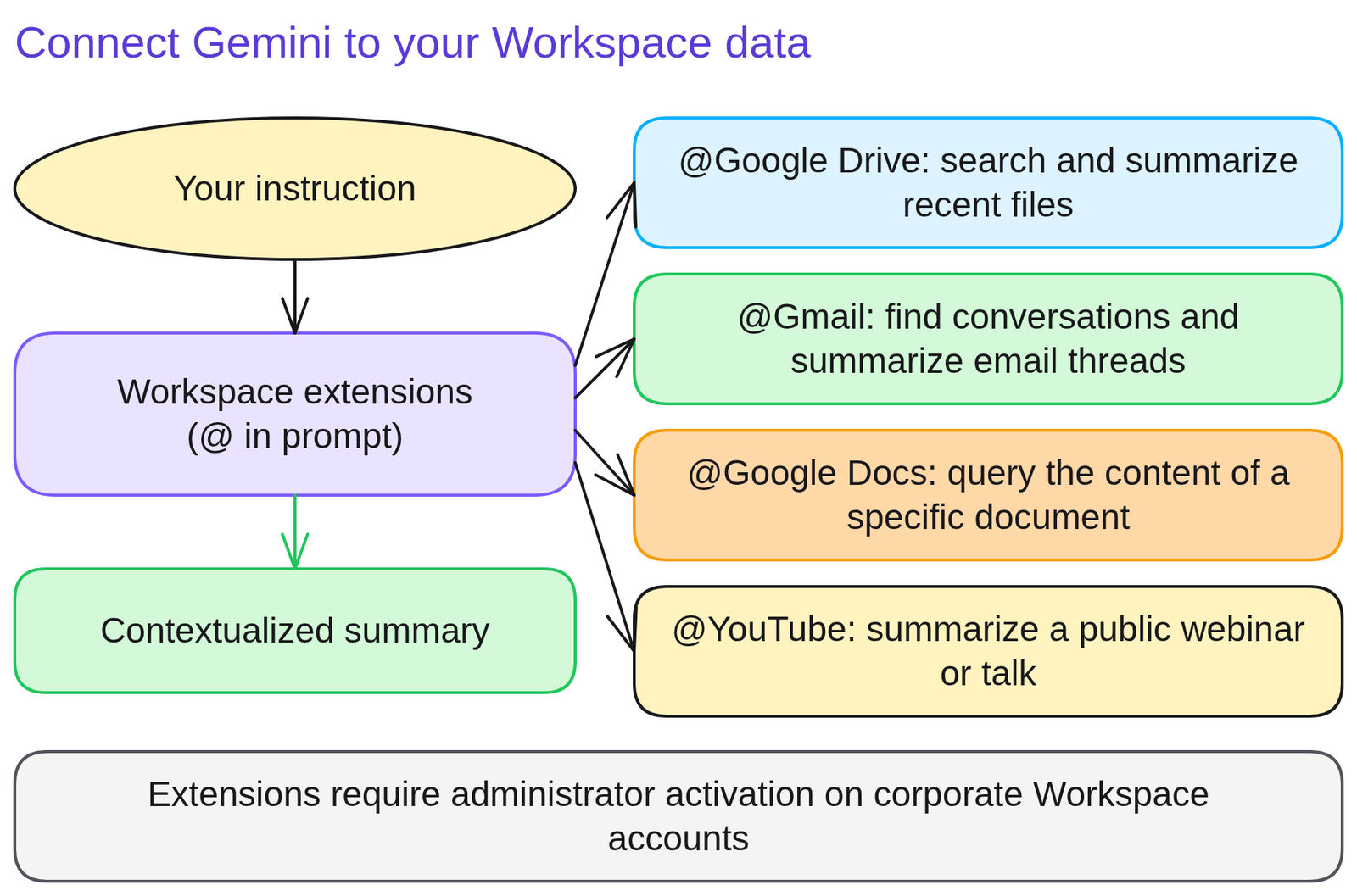
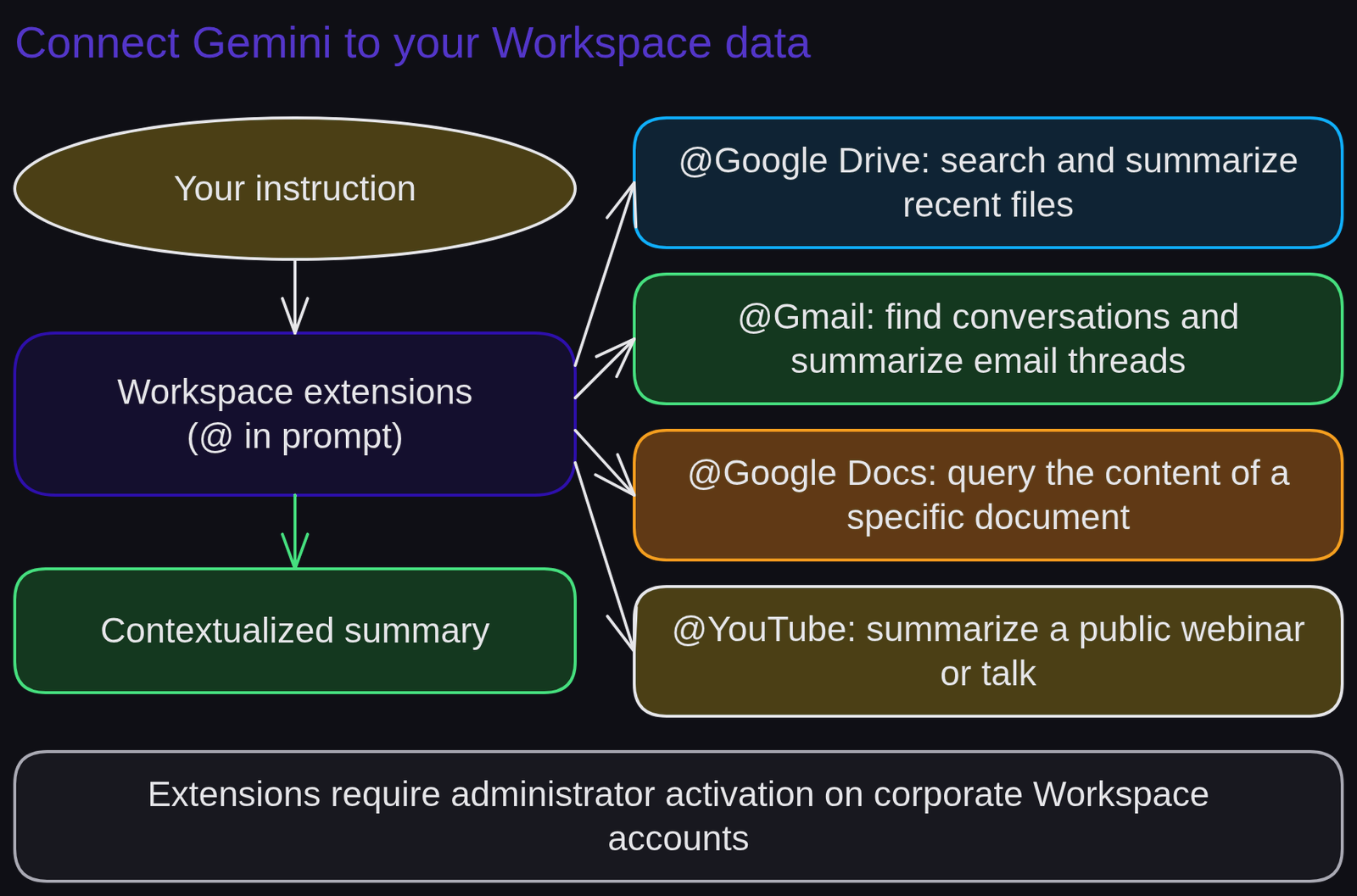
Diagram 'Connect Gemini to your Workspace data'Diagram generated by AI and reviewed 2Summarizing a Gmail thread and locating the companion Drive attachment
Summarizing a Gmail thread and locating the companion Drive attachment demonstrates how automated cross-referencing between corporate tools speeds up complex procurement negotiations.
A procurement specialist prepares to renegotiate a corporate software maintenance agreement with an existing vendor.
Weak prompt.
Find my latest messages with the vendor and tell me what was discussed.Gemini searches broadly across inbox records, returning an unfocused summary that conflates conversations across multiple vendors.
Strong prompt.
Use @Gmail to find correspondence from [email protected] over the past 60 days. Then use @Google Drive to locate the file Master_Agreement_2025. Write a 100-word summary highlighting the 3 pricing disputes mentioned in email alongside the contractual spending cap.The difference. Explicitly naming both extensions alongside strict date filters allows Gemini to cross-reference contractual stipulations with active negotiations instantly.
3Cross-reference two personal Workspace files within a single prompt
Cross-reference two personal Workspace files within a single prompt to learn how to harness Google productivity extensions for faster workplace research.
Type @Google Drive in Gemini to target an internal document, then request a synthesized executive summary. If Gmail extensions are active, incorporate them to cross-check related feedback.
Run this prompt:
'Use @Google Drive to locate my most recent project review document. Summarize three key operational priorities as 20-word bullet points beginning with an action verb.'
Self-evaluation rubric: (a) the @ symbol triggers extension activation successfully ; (b) target documents are retrieved from your Drive repository ; (c) the summary incorporates only verified internal information.
4Using @ mentions without checking whether target docs have open sharing permissions
Using @ mentions without checking whether target docs have open sharing permissions risks accidental data leaks when sharing synthesized answers with wider teams.
Gemini accesses only files permitted by your specific user account. If you summarize a restricted document and paste the synthesis into a public chat, you inadvertently disclose confidential data that colleagues lacked authorization to read.
Fix: verify the distribution classification of source files before circulating summaries produced through Workspace extensions.
Rule to remember: Gemini honors your personal access privileges, but you remain responsible for team data disclosure.
5Quiz
Three questions, instant feedback. Each option comes with an explanation.
6Proof of mastery
Use a Workspace extension (@Google Drive or @Gmail) to retrieve business information, submitting your prompt alongside the generated context summary.

Criteria
What you wrote at the start of the lesson


Going further
Review glossary terms for connector, enterprise data protection, and airtightness. The next lesson, Gemini hallucination hunt, trains you to catch subtle inaccuracies. To build custom tailored assistants, explore Create a custom Gem.
Frequently asked questions
How do you summon an extension in Gemini?
Simply type the '@' symbol in the prompt input field: an active list appears (Google Drive, Gmail, Google Docs, YouTube, Google Maps). Select the target tool.
Can Gemini read my colleagues' private Drive files?
Only documents you have legitimate permission to access under Google Workspace access controls. Gemini strictly adheres to existing tenant permission boundaries.
Why is an extension missing from my corporate account?
In enterprise environments, your Google Workspace administrator must enable Gemini extensions in the Admin console.